Installer guide — the guided in-app engine installer
Echidna's on-device engine ships as a flashable Magisk/Zygisk module. You can always flash it by hand (see Magisk Release), but the companion app also carries a guided installer that detects your root setup, installs the module, does the unload-first disable a live Zygisk module needs, and prompts the reboot that actually loads or unloads it. This page walks through that flow and is honest about the one thing it cannot do for you: prove the flash worked on your specific device.
This installs a root module — know your recovery path first
The installer flashes a Magisk/Zygisk module that hooks the audio capture path. It requires root with Magisk and Zygisk enabled, will not work on many phones even when it installs cleanly, and can bootloop a device. The installer's own risk card says exactly this before you proceed. Do not install unless you already know how to recover from a bootloop out-of-band.
Where to start it
The installer is one screen (AppDestination.InstallEngine), reachable from several
honest entry points:
- Settings → Install engine (the button reads "Install or update engine" once a module is already present).
- Dashboard — the install call-to-action shown when no active engine is detected.
- Alerts — an advisory whose action target is the installer (for example, when the app notices Magisk but no installed module).
The guided flow
The installer is driven by an explicit, honest state machine
(InstallEngineViewModel) — it never claims an "installed" or "active" state it has not
confirmed through the privileged status poll.
flowchart TD
    D([DETECTING<br/><small>first privileged probe</small>]) --> I{IDLE<br/><small>what did we detect?</small>}
    I -->|no Magisk / Zygisk| none[Nothing to install here<br/><small>honest 'not detected' message</small>]
    I -->|Magisk + Zygisk, no module| P[PREPARING<br/><small>stage bundled asset<br/>or picked .zip</small>]
    I -->|module already present| U0
    P -->|module already present| Q1[QUIESCING<br/><small>master-off + disable marker</small>]
    P -->|clean install| INS
    Q1 --> INS[INSTALLING<br/><small>magisk --install-module,<br/>poll up to 20s</small>]
    INS -->|module registers| RB1[INSTALL_REBOOT<br/><small>reboot to load</small>]
    INS -->|no register| F[FAILED<br/><small>honest reason</small>]
    U0[Uninstall requested] --> Q2[QUIESCING<br/><small>master-off + bypass</small>]
    Q2 -->|disable marker written| UN[UNINSTALLING<br/><small>remove via Magisk, poll</small>]
    Q2 -->|disable failed| F2[FAILED<br/><small>left as-is, not half-removed</small>]
    UN --> RB2[UNINSTALL_REBOOT<br/><small>reboot to finish unloading</small>]

    classDef ok fill:#1b5e20,stroke:#2e7d32,color:#fff;
    classDef warn fill:#e65100,stroke:#ef6c00,color:#fff;
    classDef bad fill:#7f1d1d,stroke:#b71c1c,color:#fff;
    class RB1,RB2 ok;
    class Q1,Q2,P,INS,UN warn;
    class F,F2,none bad;
1. Detect
The screen opens on DETECTING — a spinner while the first privileged probe runs — and
settles into IDLE, showing the real device state: whether the control service is
connected, whether Magisk is detected, whether Zygisk is enabled, the engine summary, and
the SELinux mode. These come from the same ModuleStatus probe the rest of the app uses
(module id echidna, Zygisk via the Magisk settings DB); nothing here is fabricated.
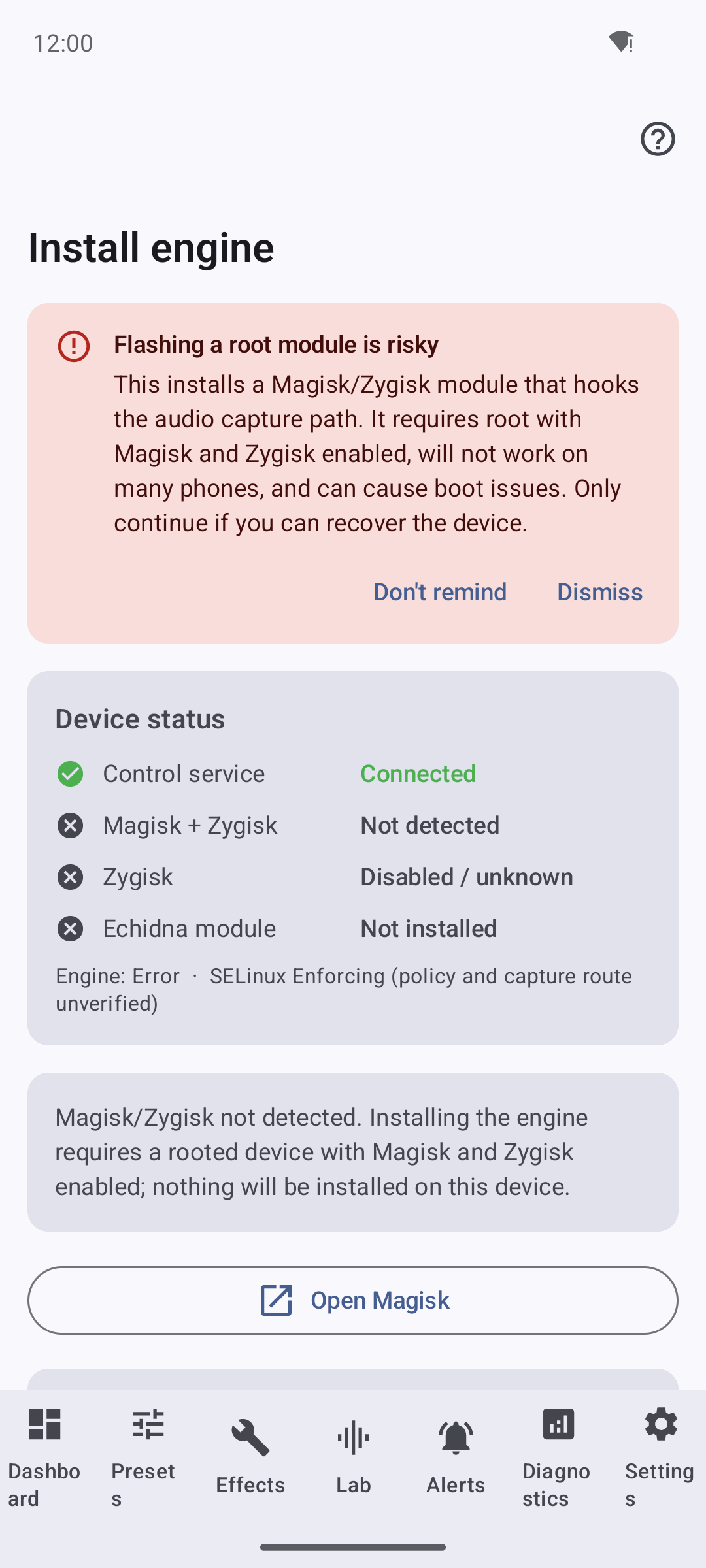
The action offered depends on what was detected:
| Detected state | What the installer offers |
|---|---|
| Service not connected | "The Echidna control service is not connected yet." — no action |
| No Magisk / Zygisk | "Magisk/Zygisk not detected … nothing will be installed on this device." — no install |
| Magisk + Zygisk, no module | Install engine module |
| Module installed, Zygisk off | "…enable Zygisk in Magisk to load it." + Open Magisk |
| Module installed + Zygisk on | Uninstall engine module |
2. Install (from a bundled zip, or a picked one)
When the build ships a bundled echidna-magisk.zip asset, Install engine module
stages it directly — no file picking. This is the turnkey path: one tap from a rooted
device with Magisk and Zygisk.
When no module is bundled, the installer says so honestly — "No engine package is
bundled in this build. Select the Echidna Magisk module .zip to continue." — and
Select module .zip instead opens the system document picker so you can point it at
a release echidna-magisk-<tag>.zip.
Staging happens in the PREPARING phase. If a module is already present, the
installer does not blindly overwrite it: because a live Zygisk module can't be
hot-swapped, it first QUIESCES — master-off + bypass so the engine stops mutating
audio, then writes the Magisk disable marker so Zygisk stops loading the old copy — and
only then installs the replacement. The install itself (magisk --install-module) runs in
the INSTALLING phase, and the installer polls the privileged status for up to 20 s
for the module to register rather than assuming success.
3. Reboot to load
A Zygisk module only loads at boot; it can't be injected into running processes. So a successful install lands on INSTALL_REBOOT:
"Module installed. A reboot is required to load the engine because a live Zygisk module can't be hot-swapped. Reboot, then reopen Echidna."
Reboot now attempts a best-effort privileged reboot. If that can't be dispatched, the installer is honest and tells you to reboot manually — it does not pretend it restarted the device.
Uninstall (unload-first)
Removal follows the same unload-first discipline in reverse:
- QUIESCING — master-off + bypass so the engine stops mutating audio immediately.
- Disable marker — written so Zygisk stops loading the module next boot. If this step fails, the flow aborts with the module left as-is rather than half-removed: "Couldn't disable the engine module … the module was left as-is rather than half-removed."
- UNINSTALLING — remove via Magisk, poll for the module to disappear.
- UNINSTALL_REBOOT — reboot to finish unloading, because a live Zygisk module stays in running processes until the device restarts.
The honest device-gated last mile
The installer drives the flow; the flash is still device-gated
Everything above — detection, staging, the unload-first disable, the reboot prompt,
the status-poll confirmation — is real and testable. The actual module flash is
the part that needs genuine root and a working Magisk. On a rooted emulator,
magisk --install-module returned Incomplete Magisk install; that last mile is
device-gated and not proven here. A clean run of this installer confirms the
module registered, not that the audio hooks transform audio on your phone — that
remains covered by Verification.
Magisk is hidden or repackaged?
Open Magisk launches the Magisk manager (stock, Delta/Kitsune, Alpha, or debug packages). If Magisk has been hidden / stub-repackaged under a random package name (a common anti-detection setup), there is no reliable non-privileged way to find it, so the installer says so — "Couldn't open Magisk automatically. If Magisk is hidden or repackaged, open it manually…" — rather than pretending it launched something.
See also
- Release Packages — what each release asset is, and why the convenience bundles cannot be fetched in-app.
- Magisk Release — the authoritative manual flash path and packaging.
- Troubleshooting & FAQ — unload-first + reboot-required, Engine Not Installed on unrooted devices, and more.
- Recovering from a bootloop — the recovery ladder if a flash goes wrong.
- Verification — what is proven on-device vs. host-only.