Build & Install
⚠️ Manual recovery knowledge required
Echidna is experimental root software and may be incompatible with the device you are using. Android capture-path interception is a very hard, device-specific problem, and Echidna is likely not to work on many phones even when built and installed correctly. Do not install it unless you already know how to disable a Magisk/Zygisk module manually from recovery, adb, safe mode, or another out-of-band rescue path if the phone bootloops. If you cannot recover from a bad module without the normal Android UI, do not flash this.
This page is the reproducible, end-to-end guide to building Echidna's shippable artifacts and installing them on a device. A successful build, APK install, or Magisk zip install is not a guarantee that capture hooks will work on the target phone.
Not building from source?
If you only want to install a published release, you do not need this page. Release Packages explains what each release file is, which two of them a normal install needs, and how to verify a download.
New to the app? Start with the wizard
Once the companion APK is installed, the app opens a 13-step first-run setup wizard that runs a compatibility probe, walks you through the recovery acknowledgement, and detects your engine state honestly. You can also hear the DSP transform locally — no root — in the Lab before you ever flash anything.
| Artifact | Produced by | What it is |
|---|---|---|
app-debug.apk / app-release.apk |
Gradle | The companion app (UI + in-app control service + libechidna_control_jni.so). |
shim-release.apk |
Gradle | The optional LSPosed/Xposed Java fallback shim APK. |
Native .so outputs |
Native superbuild | Four libraries per ABI; release delivery verifies engine, DSP, shim JNI, and default-off legacy preprocessor artifacts. |
out/echidna-magisk.zip |
tools/build_magisk_module.sh |
The flashable Magisk module that delivers the native libraries system-side. |
There are two supported build paths: a host toolchain path and a Docker path. The Docker path is the most reproducible and is the one the native → Magisk pipeline was container-verified against. Pick whichever matches your setup — the outputs are identical.
Honesty about what is verified
Everything on this page up to installing is host-/container-verified: the companion and
LSPosed APKs build, all 12 native targets cross-compile with the correct ELF architecture, and
all four native library families produce the verified flashable/APK layout. Rooted-emulator
validation also proves
native processBlock. An AudioRecord.read slice passed before the current explicit-contract
redesign and is historical evidence only. Full Magisk flashing, LSPosed injection, and current
capture-route coverage are still marked below and
covered in depth in Verification.
⚠️ Root and module install risk
This guide is not for common Android users. Flashing root modules, changing hook scope, or recovering incorrectly can soft-brick a phone and may contribute to harder-to-recover failure modes on some devices. Keep backups and a known-good recovery path. If you cannot manually disable a bad module outside normal boot, stop here. Echidna is provided as-is, without warranties or guarantees.
⚠️ Experimental compatibility
Echidna may not work on your Android version, CPU ABI, kernel/vendor audio stack, Magisk build, SELinux policy, or existing module mix. A successful build only proves the artifact was produced; it does not prove the target phone can boot or run every hook path safely.
Prerequisites
| Tool | Pinned version | Used for |
|---|---|---|
| JDK | 17 (build target) / 21 (host JBR is fine to run the build) | Gradle + sdkmanager. |
| Android SDK | platform-34, build-tools 34.0.0 | compileSdk / targetSdk = 34. |
| Android NDK | r27 (27.0.12077973) |
Per-ABI native cross-compile. |
| Gradle | 8.5 (via the committed wrapper) | Use ./gradlew, not a system Gradle. |
| CMake / Ninja | 3.x / 1.13.0 | Native configure + host DSP tests. |
minSdk is 26 (Android 8.0); the module set targets API 26 → 35+.
Gradle wrapper jar
A Gradle 8.5 wrapper is committed for android/app, android/lsposed-shim, and
android/control-service. The binary gradle-wrapper.jar is generated by Gradle itself;
if your checkout is missing it, run gradle wrapper --gradle-version 8.5 in the project
directory once (or use the echidna/android-build Docker image, which regenerates it
automatically).
Host toolchain path
1. Build the companion APK
```sh cd android/app ./gradlew clean :app:assembleDebug
→ android/app/app/build/outputs/apk/debug/app-debug.apk (~20.6 MB)
```
The debug APK is debug-signed and bundles libechidna_control_jni.so for the default ABIs.
It does not contain libech_dsp.so or the Zygisk libechidna.so — those ship in the
Magisk module, not inside the app.
For a signed release build:
```sh cd android/app ./gradlew :app:assembleRelease
→ android/app/app/build/outputs/apk/release/app-release.apk (~14.7 MB)
```
Supply keystore material through a git-ignored keystore.properties or the RELEASE_*
environment variables. Without a keystore, this direct local Gradle build falls back to debug
signing and produces a non-distributable APK. The hosted release workflow does not: it fails
before tag creation when signing inputs or the private-key entry are invalid, pins the expected
certificate, and verifies every publishable APK/bundle. The full model — property/env resolution
order, local fallback, hosted checks, and why minification is disabled for v1 — is in
the signing guide.
2. Build the native libraries (per ABI)
tools/build_native_ndk.sh configures the native/ aggregate once per ABI with the NDK
toolchain file. Point ANDROID_NDK at your r27 install:
```sh
Linux / macOS
ANDROID_NDK=/path/to/android-ndk ANDROID_PLATFORM=android-26 \ bash tools/build_native_ndk.sh
Windows (Git Bash), e.g. the SDK-managed NDK
ANDROID_NDK="C:/android-sdk/ndk/27.0.12077973" ANDROID_PLATFORM=android-26 \ bash tools/build_native_ndk.sh ```
The NDK path also resolves from ANDROID_NDK_HOME / ANDROID_NDK_ROOT. Output layout:
build/arm64-v8a/lib/{libech_dsp.so,libechidna.so,libechidna_shim_jni.so,libechidna_preproc.so}
build/armeabi-v7a/lib/{libech_dsp.so,libechidna.so,libechidna_shim_jni.so,libechidna_preproc.so}
build/x86_64/lib/{libech_dsp.so,libechidna.so,libechidna_shim_jni.so,libechidna_preproc.so}
That is 12 generated native outputs. Release tooling verifies/transports all four families: the
Magisk module consumes engine/DSP/preprocessor triplets and the LSPosed shim consumes dedicated
JNI/DSP pairs. libechidna_preproc.so remains inert until the late service proves a legacy-HIDL
system/vendor registry and stages registration for the next boot. It is never automatically applied,
session-attached, or enabled. ABI set:
arm64-v8a (primary),
armeabi-v7a, x86_64. Overrides: ECHIDNA_ABIS,
ANDROID_PLATFORM, ECHIDNA_BUILD_TYPE, ECHIDNA_CMAKE_GENERATOR,
ECHIDNA_CMAKE_EXTRA_ARGS, CMAKE.
Clean build/ when switching host ↔ Docker
A build/ tree carries a CMakeCache.txt pinned to the machine that produced it. If you
build natively and later run the Docker image (or vice-versa), delete build/ first — a
stale cache with a foreign path fails the configure step.
The plugin-signature (Ed25519) path links crypto in a layered, first-hit-wins order so it is
never silently off on device: (1) a prebuilt BoringSSL via -DECHIDNA_BORINGSSL_ROOT=<dir>;
(2) a toolchain/system libcrypto; (3) FetchContent BoringSSL (Android-only, default on,
pinned tag 0.20240913.0, nothing vendored). If none resolve, the loader stays fail-closed.
3. Build the LSPosed shim APK
The shim is an installable APK used only for the Java/AudioRecord fallback path. Its Gradle
pre-build requires the native outputs from step 2 and packages exactly
libechidna_shim_jni.so + libech_dsp.so for the three supported ABIs. It rejects missing inputs
and never packages the full Zygisk libechidna.so:
```sh cd android/lsposed-shim ./gradlew :shim:assembleRelease
-> android/lsposed-shim/shim/build/outputs/apk/release/shim-release.apk
```
The shim uses the same RELEASE_* signing environment as the companion app. A direct local build
falls back to debug signing when no release key is present; hosted publication fails closed. See
the signing guide.
4. Build the flashable Magisk module
With the native outputs present under build/<abi>/lib/, build the API-26 Dex helper and supply the
exact normalized companion signer pin:
```sh bash tools/build_trust_helper.sh RELEASE_CERT_SHA256=<64-hex-release-cert-digest> \ ECHIDNA_VERSION=25.1 bash tools/build_magisk_module.sh
→ out/echidna-magisk.zip
```
The packaged zip has a single module id (echidna) and this layout:
zygisk/arm64-v8a.so        <- build/arm64-v8a/lib/libechidna.so   (Magisk selects ABI per process)
zygisk/armeabi-v7a.so
zygisk/x86_64.so
libs/<abi>/libech_dsp.so   <- staged; customize.sh places it into system/lib(64) at install
META-INF/com/google/android/{update-binary,updater-script}
module.prop                (id=echidna, minMagisk=24000)
customize.sh               (ABI-selects the DSP + JNI engine, aborts on API<26 or Magisk<24)
post-fs-data.sh / service.sh (narrow runtime labels/permissions + boot watchdog/library staging)
common/echidna-trust-helper.jar (PackageManager signer/UID/dataDir + P-256 SPKI verifier)
common/{release-cert-sha256,trust-mode,trust-bootstrap.sh} (fail-closed late trust bootstrap)
The script fails loudly if any per-ABI libechidna.so / libech_dsp.so is missing. It is
parameterized via ECHIDNA_ABIS, ECHIDNA_VERSION, ECHIDNA_VERSION_CODE,
ECHIDNA_BUILD_ROOT, ECHIDNA_OUT_DIR, ECHIDNA_ZIP_PATH. See
the Magisk release guide for the on-device layout details.
Production is the default and rejects a missing, malformed, wildcard, all-zero, or known debug
signer pin and a missing/non-Dex helper. Local debug packaging requires explicit
ECHIDNA_TRUST_MODE=development plus the exact debug certificate digest; that output is labelled
non-production and must not be published.
GitHub Releases publish these parts separately. For normal installs, use the companion APK and Magisk zip; add the LSPosed shim only when you need the Java fallback.
echidna-companion-<tag>.apkechidna-lsposed-shim-<tag>.apkechidna-magisk-<tag>.zipechidna-native-libs-<tag>.zipechidna-apks-<tag>.zipechidna-complete-<tag>.zipSHA256SUMS.txtandRELEASE_ARTIFACTS.md
Use current releases
Avoid installing an earlier GitHub release unless you are intentionally rolling back or already know how to recover from module/boot failures. Older releases may contain bugs fixed in newer builds and can be harder to recover from after the Magisk/Zygisk module is flashed.
Docker path (reproducible)
docker/ provides pinned, offline-capable images so you do not need a local SDK/NDK, and so
CI can produce the device artifacts the host cannot. Orchestration is in docker/compose.yaml;
the repo is bind-mounted at /workspace (not copied), so editing source never forces an image
rebuild.
| Image | Purpose |
|---|---|
echidna/native-build |
Temurin JDK 17 + CMake 3.30.5 / Ninja 1.13.0 + NDK r27; builds the per-ABI native graph. |
echidna/android-build |
Temurin JDK 17 + SDK platform-34 / build-tools 34.0.0 + Gradle 8.5; builds the APK offline (regenerates the wrapper jar if absent). |
echidna/magisk-packager |
Alpine + zip; consumes the per-ABI libs and runs build_magisk_module.sh. |
echidna/ci-local |
Orchestrates native-build → magisk-packager → android-build against the host Docker daemon (profile ci). |
echidna/emulator (optional) |
KVM Android emulator for instrumentation/E2E; needs /dev/kvm (profile emulator). |
Build the images, then run stages:
```sh docker compose -f docker/compose.yaml build
(a) per-ABI native libs → build//lib/
docker compose -f docker/compose.yaml run --rm native-build
(b) debug APK (offline after the first Gradle dep fetch; cached in a volume)
docker compose -f docker/compose.yaml run --rm android-build
(c) flashable Magisk zip (consumes native-build output) → out/echidna-magisk.zip
docker compose -f docker/compose.yaml run --rm magisk-packager
(d) full pipeline (needs the host Docker socket; pass the host-absolute repo path)
ECHIDNA_REPO="$PWD" docker compose -f docker/compose.yaml --profile ci run --rm ci-local ```
The native → Magisk chain was run container-to-container end-to-end. magisk-packager consumes the
engine/DSP pairs plus all three inert preprocessor ABIs into out/echidna-magisk.zip.
See Verification for the recorded results.
Ninja pin
docker/native-build pins Ninja 1.13.0. An earlier 1.12.1 pin was a version that
was never published to PyPI and broke the image build; 1.13.0 ships the manylinux
wheel the base image needs.
Docker validation scope
The native → Magisk pipeline has run on a live daemon and reproduced the checked payload. The
first android-build run needs network for Gradle dependencies. Container success remains
artifact evidence; the hosted signed-release verifier and live-device capture tests are
separate gates. See docker/README.md.
Install & activate on a device
Steps 1 and 2 (APK install, launch, screen navigation) are verified on an unrooted emulator.
The app/service native processBlock path is verified on rooted Android 13/14 emulators. The
recorded native AudioRecord.read hook probe predates the current explicit-contract route and is
not current reachability proof. Magisk flashing, LSPosed activation, and current supported capture
routes are still device-gated.
⚠️ Know the boot failsafes before flashing
Do not proceed unless you can disable the module without a normal Android
boot. The intended rescue markers are Magisk's module disable file for
echidna, /data/adb/echidna/disable, the project's safe-mode path,
/cache/echidna-disable, and /metadata/echidna-disable. The automatic
boot watchdog is intended to disable Echidna after repeated boots that do
not reach the late-start service, but it must not be your only recovery plan.
If the device is already bootlooping, follow
Recovering from a bootloop.
⚠️ Install guard expectations
Before a release is treated as safe to flash on hardware, the install path should alert on Android API, Magisk/Zygisk state, CPU ABI, primary/secondary ABI mismatch, missing native libraries, unknown vendor audio family, SELinux constraints, duplicate Zygisk/LSPosed scope, incomplete bridges, stale runtime files, and known incompatible module mixes. These checks should warn loudly and fail closed where required, but they do not transfer responsibility away from the user.
1. Install the companion app
⚠️ Install is not compatibility proof
Installing the companion APK only proves that Android accepted the app package. It does not prove Zygisk loading, LSPosed injection, SELinux access, or vendor audio-HAL capture interception on this phone. Expect many devices to remain unsupported.
Signing-certificate migration
Android only accepts adb install -r when the installed package and replacement share the same
signing certificate. If an older companion or shim is debug-signed and the new release uses a
real release certificate, back up any needed app data, uninstall the old package once, and then
install the release APK. Do not work around a signer mismatch by weakening release verification.
sh
adb install -r android/app/app/build/outputs/apk/debug/app-debug.apk
Launch it and accept the consent/legal warnings. On an unrooted device the app runs, all screens render, and Diagnostics honestly reports module not active (the native engine is not present without the Magisk module).
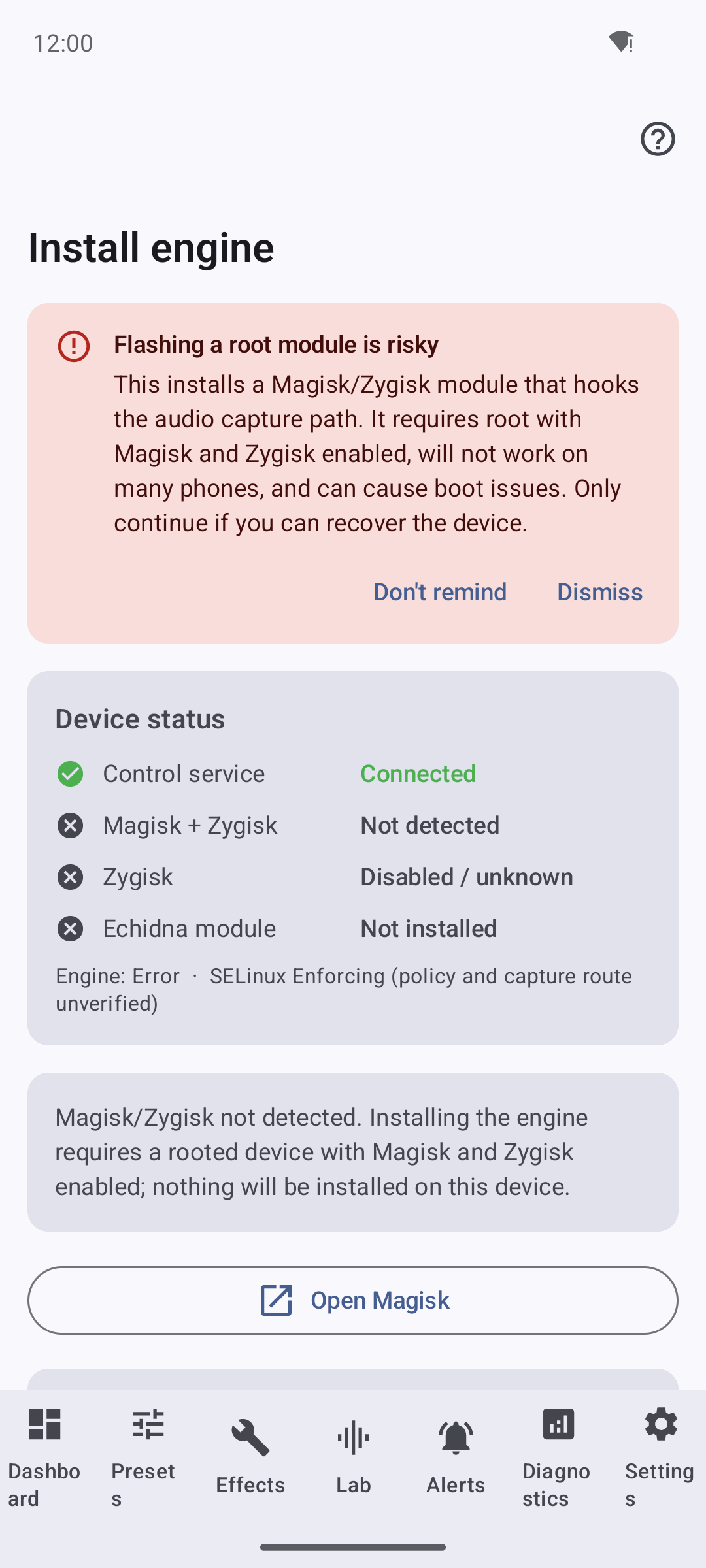
The guided Install-engine screen on an unrooted emulator. It detects and reports state honestly — the engine reads not installed because nothing has been flashed. Installing the module is the device-gated step below.
2. Flash the Magisk module (device-gated — needs root)
Push and install the module, then reboot:
sh
adb push out/echidna-magisk.zip /sdcard/Download/
Install echidna-magisk.zip from Magisk Manager → Modules → Install from storage (or via
recovery), then reboot. The installer requires Magisk 24.0+ and aborts on API < 26.
3. Enable Zygisk and LSPosed (device-gated)
- In Magisk, enable Zygisk (Settings → Zygisk) and reboot if you just turned it on.
- Install
echidna-lsposed-shim-<tag>.apkif you need the Java fallback path, install and enable LSPosed, then enable the Echidna module and select its scope (the target apps you want hooked). The Zygisk native module remains the primary native hook path. - Set the companion's DSP engine mode to Compatibility — Settings → Engine → DSP engine mode → Compatibility. This step is not optional and it is the one most often missed.
Installing and enabling the shim is not enough to make it do anything
Exactly one engine may own capture for a given app, so the companion publishes a capture
owner per whitelisted process. It names the LSPosed shim as owner only while DSP engine
mode is Compatibility; in Native first (the shipped default) and Low latency it names
Zygisk instead. The shim fails closed unless it is the named owner, so with any other engine
mode LSPosed will report the module as loaded and active while it transforms nothing at all.
Check the effective owner under Diagnostics → Pipeline → Advanced diagnostics → Capture
ownership. logcat also carries the shim's own verdict per process, e.g.
EchidnaModule: hooks installed but INERT for <pkg> [NOT_CAPTURE_OWNER].
The shim covers android.media.AudioRecord and nothing else
The LSPosed shim hooks the Java/NDK android.media.AudioRecord capture client only. Apps that
record through AAudio, OpenSL ES, or Oboe (which sits on top of AAudio/OpenSL) are
not covered by the shim in any configuration — no scope, whitelist, or engine-mode setting
changes that. Those paths need the native Zygisk module.
4. Grant the per-app whitelist
Open the companion app → Settings → Per-App Whitelist, enable the apps you want processed, and assign a preset per app. Hooking is fail-closed: a process is only hooked when it is both whitelisted and hooks are enabled.
5. Verify
Use Diagnostics and Compatibility Wizard to inspect availability, policy, and route evidence. Installed/Zygisk/tool availability does not prove transformation; require recent transformed-buffer telemetry plus a route-matched call with a lab counterpart.
Current route expectations:
- AAudio, OpenSL ES, and tinyalsa are normal-flow native candidates; the LSPosed Java
AudioRecordpath is the compatibility candidate. All require live-device proof. - Native
AudioRecordand libc raw-device reads are developer-contract-only and stay disabled unless explicit sample-rate/channel/format metadata is supplied. - Audio HAL and AudioFlinger fail closed as
unsupported_injection_boundary; Diagnostics must not be interpreted as proof that those routes transform audio. - The legacy input preprocessor is packaged and may be registered for the next boot on a proven
legacy-HIDL system/vendor registry. The default-off Legacy AudioFlinger preprocessor
(experimental) setting only permits authorized LSPosed attachment for eligible user-0
AudioRecordsessions; the switch is unavailable from work profiles and other secondary users, and it is not processing proof.
Assign one capture owner per process
Zygisk receives UID-scoped v2 policy over an authenticated socket; LSPosed receives
process-scoped policy over authenticated read-only Binder. Each consumer requires its own
captureOwners value. Do not configure both stacks to own the same target.
What is verified vs. device-gated
| Step | Status |
|---|---|
| APK build (debug + signed release) | Host-verified |
| 12 native targets cross-compile; 9 release artifacts transport | Host- and container-verified |
Flashable echidna-magisk.zip layout |
Verified (correct arch, single id) |
| Docker native → Magisk pipeline | Container-verified end-to-end |
| APK install + launch + screen nav | Emulator-verified (unrooted) |
Native processBlock via in-app service |
Rooted-emulator verified (Android 13/14) |
Historical native AudioRecord.read interception |
Passed before explicit-contract redesign; not current reachability proof |
| APK install -> service bind -> live AIDL round-trip | Emulator/rooted-emulator verified |
| Live Zygisk module load + real hook install on arm64 primary | Device-gated / NOT verified here |
| LSPosed shim injection + authenticated Binder policy under SELinux | Device-gated / NOT verified here |
| Legacy preprocessor packaging/registration | Implemented for eligible system/vendor HIDL devices; device load proof pending |
| Legacy preprocessor session attachment/enablement | Default-off LSPosed candidate implemented; device proof pending |
| SELinux enforcement + supported capture candidates on real hardware | Device-gated / NOT verified here |
| Native AudioRecord/libc normal-flow metadata | Not implemented; developer contract only |
| Audio HAL / AudioFlinger transformation | Unsupported injection boundary |
| x86_64 trampoline under real injection | Host harness verified; full current release injection NOT verified |
| armv7 direct-route relocator | Host-proven (relocation harness + libechidna.so links under NDK); on-device execution device-gated |
The full matrix and a step-by-step reproduce-on-real-device procedure are in Verification.