
sortOfRemoteNG handles credentials and opens privileged remote sessions. Security therefore depends on more than encryption: transport verification, constrained IPC, safe diagnostics, release signatures, and explicit user decisions all form part of the boundary.
Core expectations
| Area | Default posture |
|---|---|
| Secrets at rest | Separate native global master-key envelopes, optional database passwords, and export passwords; inspect actual disk state rather than assuming configuration encrypted every file |
| Live secrets | Decrypted values exist in memory while unlocked; settings logs record changed field names rather than credential-bearing old/new values |
| TLS | Certificate chain and hostname verification enabled; insecure exceptions are explicit and per connection |
| Remote host trust | Host or certificate changes require a visible trust decision rather than silent downgrade, and the decision is stored with the database that made it |
| Tauri IPC | Commands accept validated, typed inputs and delegate privileged work to Rust |
| REST automation | Disabled by default and loopback-oriented unless remote access is deliberately configured |
| Updates | Bundles must pass the updater’s pinned Ed25519/minisign verification |
Trust decisions are database state
Every host key and server certificate you approve is a Trust Center record, and each record belongs to one user database.
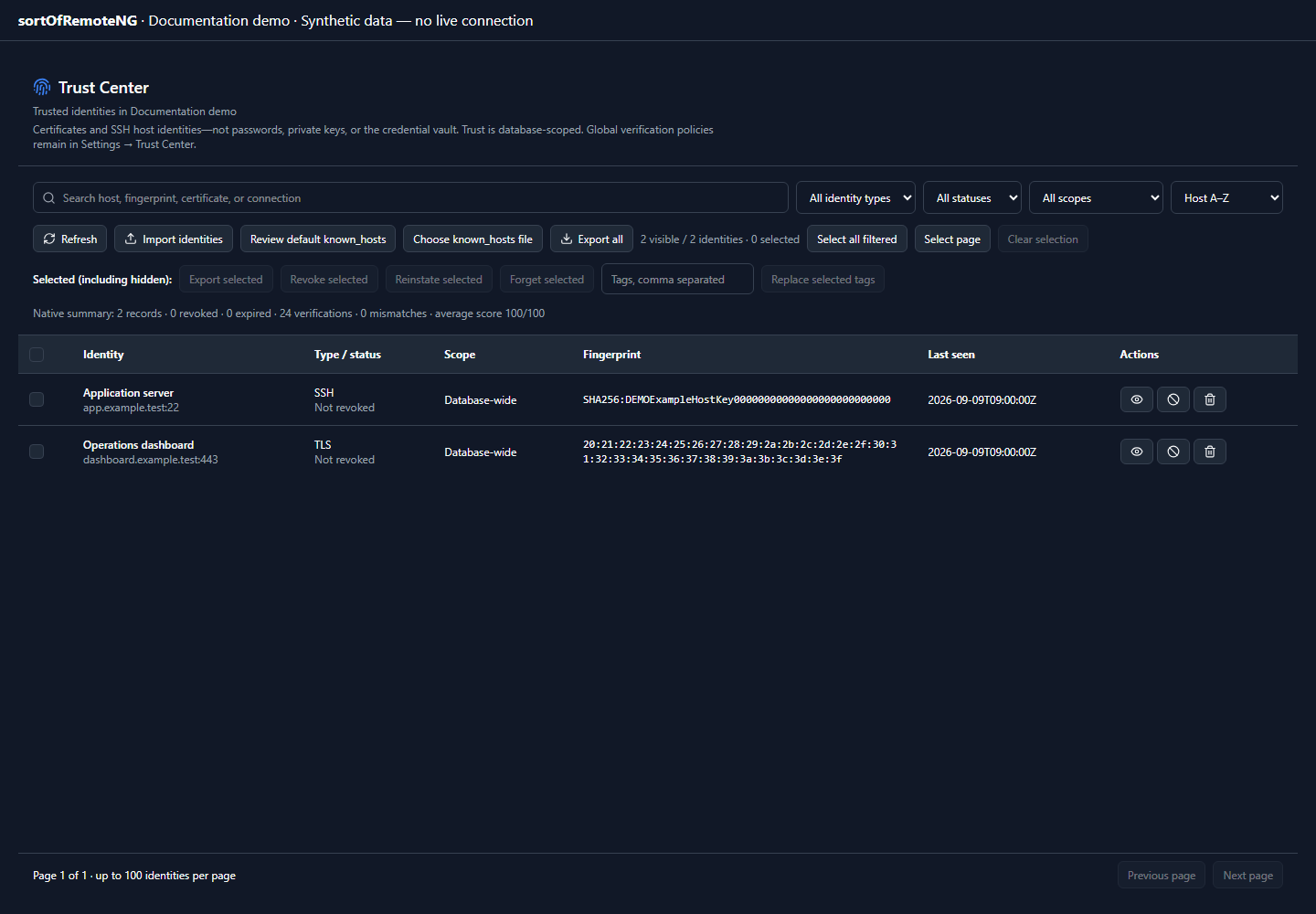
The store lives beside that database’s payload:
<app_data>/databases/<id>.json         connections
<app_data>/databases/<id>.trust.json   trust records for that database
- Same durability ladder. The trust file carries the same
SDBFpreamble, checksum, and.tmp/.bakwrite-and-read ladder as the connection payload, so a torn write recovers the previous generation instead of losing every memorized identity. - Separate artifact policy. The TrustStore family controls the global envelope around these files under its own sub-key. Automatic/native defaults preserve the existing master-encryption behavior; an explicit plaintext choice removes that outer envelope, not the database’s separate password. Configured but locked, trust reads and writes fail closed: no silent downgrade or “accept anything” fallback.
- Same portability. Export, import, clone, and backup carry the records while the “Trusted hosts & certificates” inclusion stays on (the default). Records hold fingerprints and public certificates only — never secrets — so they are safe to move with a credential-free export.
- Scoped deliberately. A host trusted in one database is unknown in another, switching databases switches the trust context, and with no database open the verifiers have nothing to consult and refuse rather than accept. Use the Trust Center’s Export JSON / Import JSON buttons to copy decisions between databases on purpose.
- Deleting a database deletes its trust. Removing a database removes
<id>.trust.jsonand its ladder siblings with the rest of that database’s data.
In the dedicated Trust Center, use an identity’s Change scope action or select rows and choose Change selected scope. Review a database-wide destination or a saved connection in the same database; no destination is selected automatically. The selected connection’s name, protocol and host help identify it, but scope assignment does not change the stored endpoint, fingerprint or identity type. A connection-specific decision applies only to that matching endpoint/type. Database-wide decisions can be inherited by matching connections unless a specific record or Forget marker blocks inheritance.
Scope changes preserve approval, revocation, expiry, policy and history—they do not approve or reinstate identities. The reviewed security decision is checked again natively; a changed fingerprint or security policy, a removed destination, or a destination conflict rejects the whole batch without overwriting another record. Already-matching scopes are reported separately from moved records. The operation does not switch databases, open sessions or unlock credentials automatically; an unavailable or expired database lease must be unlocked explicitly before reviewing again.
Migrating from the pre-26.28 sidecars
Earlier builds kept one global trust_store.json beside the application data plus a separate rdp-cert-trust.json for RDP server certificates — both plaintext and shared by every database. In Settings → Trust Center, Review legacy trust migration inspects the pending databases before an explicit migration. Existing ready databases can be processed sequentially; locked databases require an intentional password or supported managed-key-slot unlock. Migration does not select another database, close dirty tabs, or automatically unlock from a vault. Global records are considered for each database, connection-scoped records only for connections it owns, and RDP pins become ordinary rdp records. Missing decisions are added without replacing existing identities, policies or revocations; identities previously removed with Forget remain excluded. Per-database progress, preserved/added counts and errors remain visible, and cancellation stops before the next database. Legacy files remain unchanged inputs. Separate confirmed deletion is enabled only when native receipts verify coverage against the current source, database payload and destination decisions; opening every database once or merely finding a trust sidecar is not sufficient. Drift, unreadable files or incomplete migration keep cleanup blocked and require review or retry.
Normal cleanup remains guarded by that migration coverage. The separate Force delete legacy trust files… action bypasses coverage only: it requires typing FORCE DELETE LEGACY TRUST, verifies recovery copies before removal, and refuses changed or unsafe files. It does not remove current per-database trust records; unmigrated approvals may be lost and future connections follow your trust policy. Recovery copies retain their original format, may contain plaintext trust metadata, and are outside artifact encryption management. They are not automatically imported, and deletion is not secure erasure.
SSH host keys and known_hosts
Accepted SSH, SFTP, and SCP host keys are Trust Center records too, keyed by host:port, so one accepted key covers the terminal, the file browser, and SCP for the same endpoint. OpenSSH’s known_hosts becomes an import source rather than the authority: a key already listed there is adopted into the Trust Center and accepted instead of re-prompting, and Settings → Trust Center can import the whole file on demand (hashed |1|… entries are skipped, because their host names are unrecoverable, and an endpoint already recorded is never overwritten). By default an accepted key is still appended to known_hosts so other tools sharing that file keep working; the per-connection also_write_known_hosts option — present on SSH, SFTP, and SCP connections and on by default — turns that dual write off and keeps the decision inside the database only.
At-rest threat model
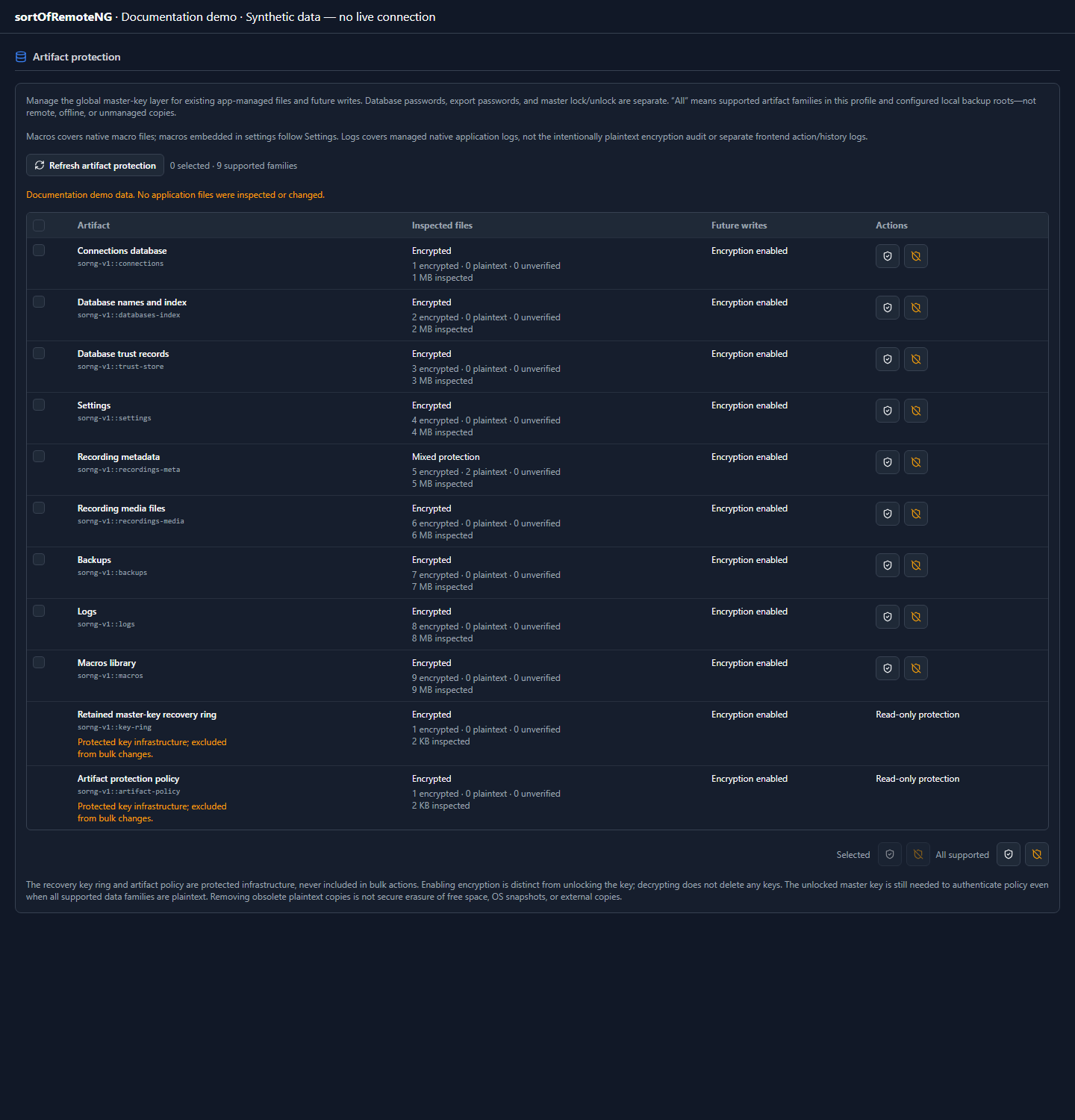
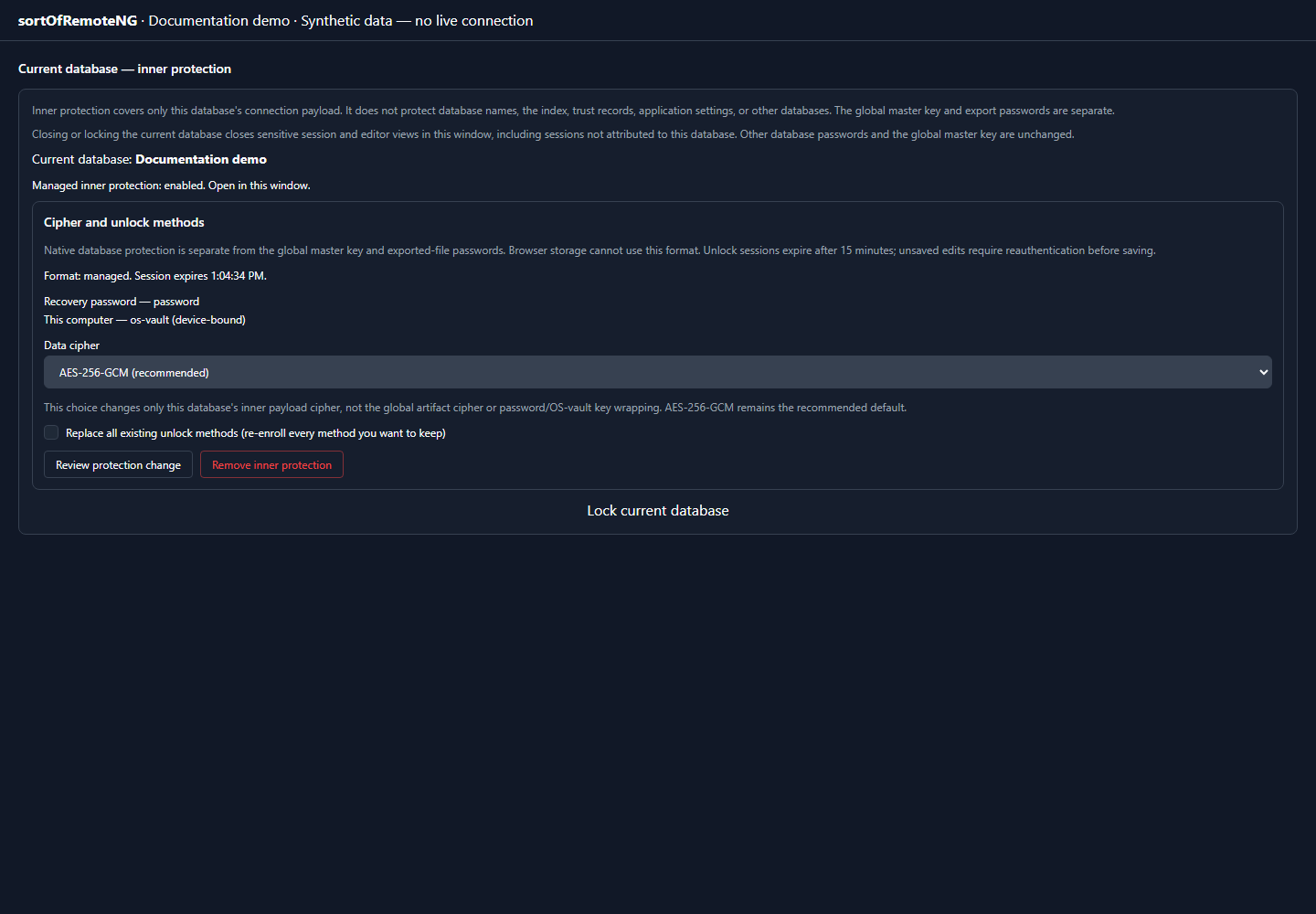
Use Security → Artifact protection for app-managed files and future-write policy. Use Current database for just one database’s inner payload cipher and unlock methods. Neither control changes a remote host’s trust decision or an already exported copy.
The encryption design primarily protects against offline access to application data and backups. It does not protect plaintext already available to an attacker controlling the unlocked process or operating system account.
Settings → Security distinguishes application-wide master-key/vault controls, the current database’s separate password, and global policy/export defaults. A database password does not protect database names, the index, trust records, or global preferences. Opening a database does not restore global security configuration from its snapshot.
Configuring a master key is not a migration audit. The database disk-status card reports native envelope/plaintext evidence and explicitly distinguishes unverified decryption. Password changes use coordinated payload/index transactions; cleanup-pending outcomes can be committed successes with warnings. External copies are not rewritten or securely erased by a password change.
The Artifact protection panel manages existing files and future-write policy per family, selected families, or all supported managed families. It shows inspected state rather than codec readiness, requires a native preview and confirmation, and reports partial bulk outcomes. Decrypting does not remove inner database passwords, independent backup/export password layers, or retained keys. The key ring and authenticated policy remain protected and excluded from bulk operations; policy still requires the unlocked master key even if all data families are plaintext. Remote/offline copies, intentional plaintext audit logs, and unsupported or unverified stores are not silently counted as protected. Legacy global trust inputs require the separate Trust Center migration/cleanup workflow. Removing managed obsolete plaintext is not secure erasure; see the detailed scope and recovery rules.
Global lock preparation belongs to the primary window; detached requests wait for its save/cleanup acknowledgement. A vault-only lock requires an intentional vault-unlock action, but does not add a separate application password challenge. Global settings are reloaded after unlock before the interface/policies resume. Browser previews do not have native global at-rest protection.
Full master-key rotation retains up to five previous keys in an encrypted recovery ring. This preserves recoverability but means older ciphertext may remain readable with retained keys; it is not forward secrecy or a single atomic transaction across all profile files. Keep appropriate key backups, and never delete encrypted files or key receipts merely to clear an error.
Read Encryption at rest before changing the vault, artifact codecs, backup behavior, recordings, or key lifecycle. That document defines envelope formats, tamper expectations, unlock behavior, and explicit out-of-scope attackers.
The implementation’s current receipt and crash-recovery limits are documented in Master-key recovery and locking.
Operational hygiene
- Prefer references to saved credentials over copying secret values through UI components.
- Never include passwords, tokens, private keys, raw VPN configuration, or unredacted connection exports in an issue.
- Treat screenshots as data exports; inspect every visible hostname, username, tab, notification, and log line.
- Keep TLS and host verification enabled. If a lab exception is necessary, scope it to one connection and document why.
- Review credential inclusion before import, export, or database clone operations.
- Remove sensitive test fixtures after use and keep them outside version control.
Cloud and Lights-Out credentials
Cloud provider settings contain only non-secret resource context. The provider credential uses the protected saved-connection password boundary; OVHcloud’s application key, application secret, and consumer key are one credential bundle inside that boundary. Public cloud status DTOs and Lights-Out safe-config DTOs exclude credentials. Internal iDRAC, iLO, Lenovo, and Supermicro configuration serialization also skips password material.
Legacy cloudProvider records are normalized when opened and saved without
copying secret fields into provider settings or runtime handles. A malformed
OVHcloud bundle is never rendered raw: the editor keeps it masked and requires
all three replacement fields. Operational and rollback details are in
Cloud & Lights-Out Connections.
Updates and releases
The public key embedded in the application verifies updater artifacts. The corresponding private key belongs in the release secret store, never in the repository. Key rotation requires a bridge strategy because already-installed clients only trust keys shipped in builds they can verify.
See Updater signing and feed setup and Releases for the operational flow.
Report a vulnerability
Do not open a public issue containing exploit details or secrets. Follow the repository’s security policy on GitHub for the current private reporting channel, supported-version statement, and disclosure expectations.
For route-specific data handling, see Network Paths. For automation context and script validation, see Behaviors.