Client Platforms
The web package is the shared application core. Desktop embeds it in Electron, and mobile bundles it inside a React Native WebView with native adapters. That shared foundation keeps the data model and encryption behavior aligned, but platform integrations are intentionally different.
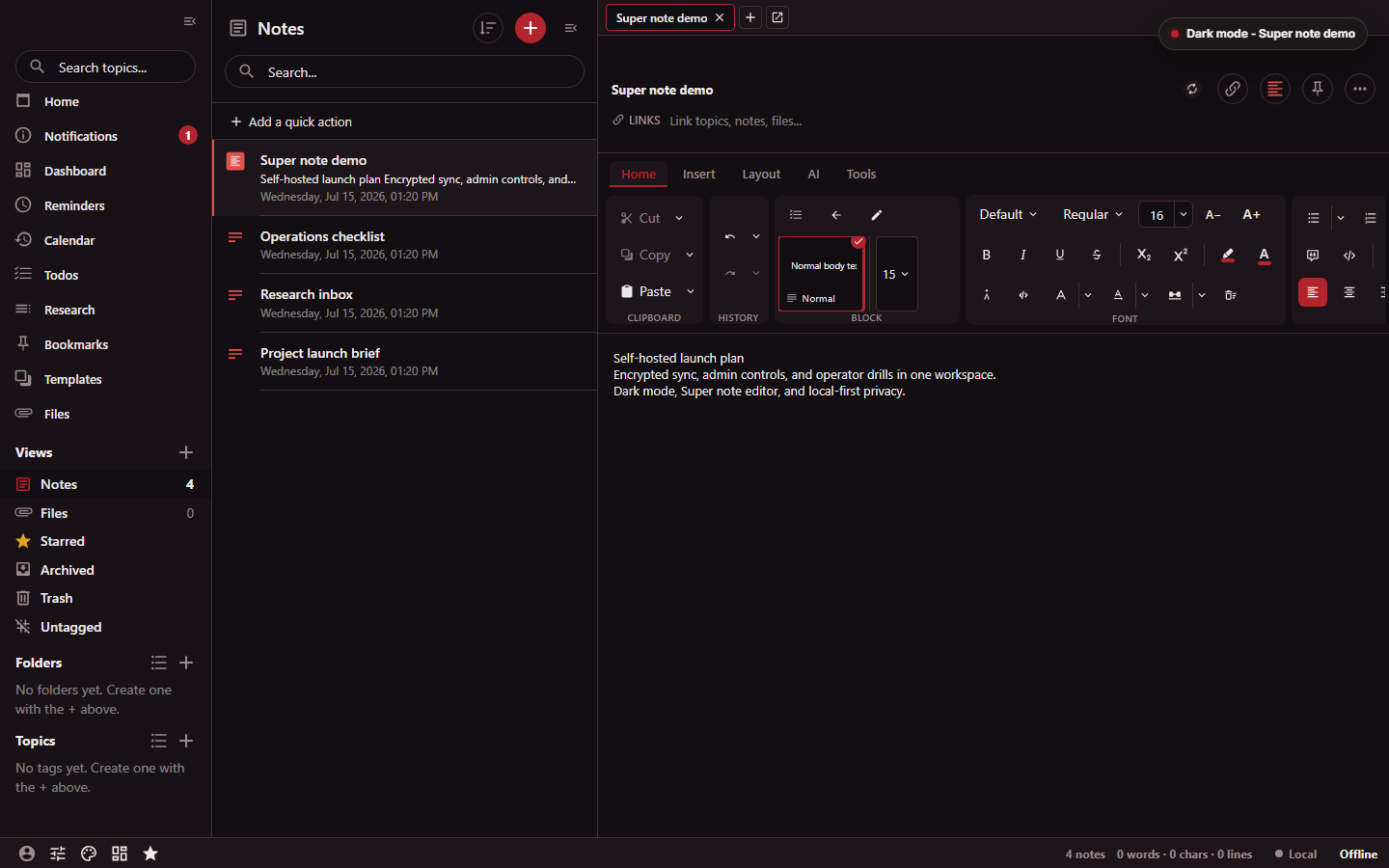
The real capture documents the wide web and desktop layout only; it does not depict mobile, native backup, biometric, or browser-clipper controls.
- The navigation sidebar exposes its own topic search.
- The notes list has a separate collection search.
- The open Super note shows its Home ribbon tab.
Capability matrix
| Capability | Web | Desktop | Android/iOS | Browser clipper |
|---|---|---|---|---|
| Notes, tags, search, and editors | Yes | Yes | Yes | Captures into the app |
| End-to-end encrypted account sync | Yes | Yes | Yes | Uses the embedded app session |
| Local-only use | IndexedDB-backed | Desktop storage | Mobile storage | No independent vault |
| Encrypted files | Browser transfer | Native file access and preview | Native file access, preview, and sharing | Captures page content, not a general file client |
| OS key storage | Browser-dependent | Native keychain via keytar |
Native keychain | Extension local storage for the pending clip |
| App lock/biometrics | App passcode; optional passkey as an additional recoverable gate | App passcode; optional passkey and OS integration | Fingerprint/biometric adapter | No |
| Automatic local backups | No | Encrypted text, optional plaintext, and file backup paths | No desktop-style automatic folder backup | No |
| Multiple app windows | Browser windows/tabs | Native multiple-window support | No | Popup plus app window |
| OS share target | Browser share behavior | File-system integration | Android and iOS share targets | Captures active browser content |
| Automatic updates | Web deployment | Electron updater | Mobile release installation | Browser extension distribution |
Treat this table as a platform boundary, not a statement that every setting is identical on every release. The shared web bundle can expose a feature before a native package adds the matching OS integration.
Web
The web client is the reference user interface and runs against the bundled home server. Use another Standard Notes-family server only after validating the exact client/server version pair. Its persistent local state lives in browser storage. Browser controls therefore matter:
- Do not clear site data unless the account has fully synchronized or you have a current export.
- Local-only sessions have no server copy. Clearing the browser profile can be destructive.
- File downloads and passkey support depend on browser permissions. The local passkey gate requires an app passcode as its recovery method.
- A private browsing session is not a durable local database.
The web app also contains the administrator console. It is shown only when the client believes the account has the admin role, and every operation is re-authorized by the server.
Desktop
The Electron package adds:
- native keychain storage;
- automatic encrypted text backups and optional plaintext/file backup folders;
- multiple windows and the
standardrednotes://deep-link protocol; - tray and minimize-to-tray behavior on Windows and Linux;
- spellchecking and dictionary management;
- file-system permission handling and native file previews;
- a packaged home-server manager; and
- update discovery and installation.
Desktop backup folders are local to that machine. Copy them to independent storage if they are part of a recovery plan. Plaintext backups trade recovery convenience for loss of encryption at rest.
Desktop release targets include macOS DMG/ZIP, Windows NSIS, and Linux AppImage and Debian packages for x64 and arm64. See Releases and Upgrades before installing an asset.
Android and iOS
The mobile client bundles the web application and connects it to native services. The source includes:
- native keychain storage;
- biometric/fingerprint scanning;
- Android secure-window and iOS privacy-snapshot protection;
- native file download, preview, and share operations;
- notification permissions and file notifications; and
- Android and iOS share receivers for text, links, images, video, and files.
The mobile release contract validates a universal Android APK and AAB with
arm64-v8a and x86_64 native payloads, plus an iOS device arm64 artifact.
An iOS device artifact is not a simulator build.
When sharing sensitive material into the app, confirm the target account and vault before saving. The OS share extension temporarily stages the incoming data so the main application can import it.
Browser clipper
The clipper has separate Firefox Manifest V2 and Chromium Manifest V3 builds. It uses Mozilla Readability for article extraction and can work with:
- the current text selection;
- a selected DOM node; or
- the readable article, including its title and source URL.
The popup is the web app built for the clipper target. A self-hosted build must not silently inherit an unrelated hosted-server default; configure the intended server in the extension build or in the client.
Browser permissions are broad enough to read content on the active page. Review the extension package and installation source as you would any software that can inspect pages containing sensitive information.
Choosing a client
- Use web for immediate access without installing an application.
- Use desktop when local automatic backups, multi-window workflows, native files, or system integration matter.
- Use mobile for biometric access, notifications, and OS share-sheet capture.
- Use the clipper for browser research capture; it complements rather than replaces a full client.
- Use
srn-clientfor scripted encrypted note operations without a graphical interface.
For cross-client behavior, continue with Sync and Data Lifecycle and Security and Account. For original Standard Notes clients, servers, and backups, use the compatibility matrix.