Private notes, fully documented
Understand, use, and operate Standard Red Notes
Follow a first-note walkthrough, compare every client, deploy your own server, administer accounts, automate encrypted workflows, or trace the architecture down to its verification gates.
Use the full-text search in the sidebar from any page. Press Ctrl + K (or ⌘ + K on macOS), or press / when you are not typing, to search page titles, headings, and body text. Every result shows its page, section path, and a contextual text snippet with matching terms highlighted. Use ↑/↓, Home, and End to move without leaving the keyboard, then press Enter to open the selected section.
Workspace tour
See the visible workspace panels
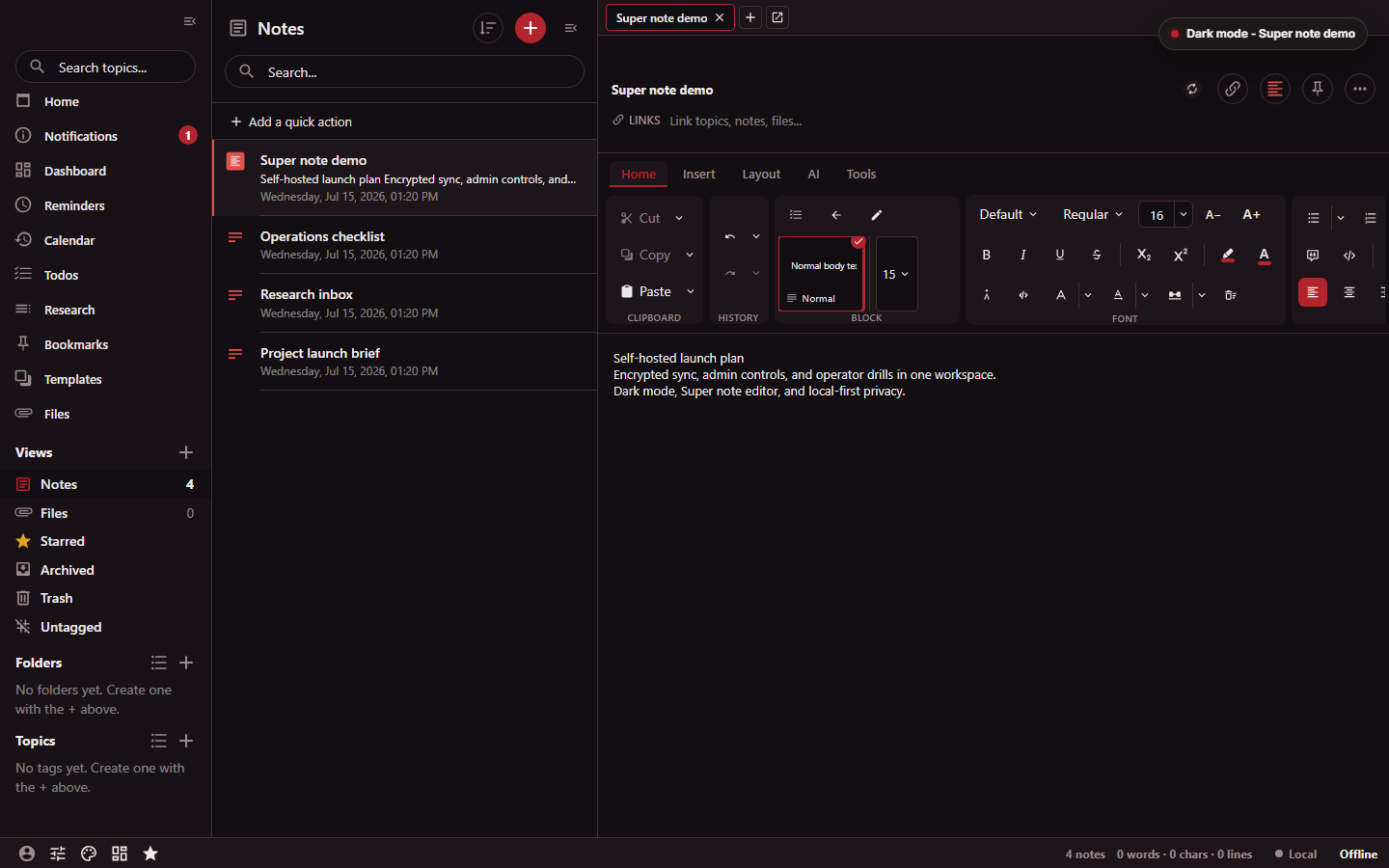
The numbered targets identify controls verified in the source capture, not features inferred from hidden menus.
Evidence boundary.
This historical genuine PNG is identity-checked offline, but its current locator-to-control proximity has not been revalidated against a live app since the manifest was expanded; run the capture script before claiming current live-locator proof.
Asset SHA-256 0e74af6bfb127613…
at source commit f24469649ca8
(2026-07-15T13:20:49+01:00).
- Search topics from the navigation sidebar.
- Search the visible Notes collection.
- Open the visible Home ribbon tab in the Super editor.
Choose a path
Learn the product
Create a first note, choose an editor, organize a vault, use search, and understand what stays encrypted.
Pick a client
Compare web, desktop, Android, iOS, and the browser clipper, including platform-only capabilities.
Self-host and operate
Choose a deployment profile, configure a reverse proxy, protect data, monitor services, upgrade, and recover.
Automate and integrate
Use the encrypted client CLI, operator CLIs, MCP bridge, OpenClaw, HTTP API, webhooks, and integrations.
Review security boundaries
Trace encryption, authentication, MFA, trusted devices, recovery, scoped credentials, sharing, and operator controls.
Build and verify
Map the monorepo, runtime services, request paths, CI gates, release contracts, and focused validation commands.
Feature atlas
The Capability Map is the quickest way to see what ships across the app, server, desktop and mobile packages, CLIs, MCP bridge, OpenClaw, administration surfaces, backups, and integrations. It labels each capability as one of:
- Shipped — executable implementation and supporting evidence are present.
- Operator-gated — the implementation must be enabled or configured.
- Conditional — a named implementation limit or unverified external dependency narrows the claim.
The shipped MCP Bridge, OpenClaw, and n8n workflow boundary each have separate runtime and security guides.
Documentation principles
- Encryption boundaries and any intentional plaintext path are named directly.
- Runtime claims distinguish implemented, operator-gated, and conditional behavior.
- Copy-ready commands include the directory and assumptions that make them safe.
- Destructive recovery and administration steps put backups and verification first.
- Capability claims point back to implementation, tests, configuration, or release contracts.